A buyer opens the box, holds the watch to a payment terminal, and nothing happens. The spec sheet said NFC. The listing said NFC. The watch does have NFC — it just cannot pay for anything. That gap between the chip and the checkout is a common source of returns and one-star reviews, and it is entirely avoidable.
NFC is a radio, not a payment system. What it can do depends on the software, the wallet, the bank and the country — and on most watches from China the honest answer is: unlocks and access, not payments.
NFC is a chip, not a payment system
NFC is a short-range radio that works over a few centimetres. Tapping to pay needs far more: a secure element or host card emulation, tokenisation agreed with a bank, a certified wallet app, a device that passes the wallet’s security checks, and a bank that supports the wallet in the buyer’s country. Miss one link and the tap fails.
Google’s Wallet help pages lay out the chain: the device must support NFC, Google Wallet must be the default payment app, a card must be added, a screen lock must be set, and the device must be Play Protect certified and unmodified — no custom ROM, no root, no unlocked bootloader. The version floor: Android 9.0 or higher on the phone, Wear OS 2.18 or higher on the watch, and a country where Wallet is supported. The basic rule: without NFC support, you cannot pay contactless. The reverse is just as true — having NFC does not mean you can pay.
Most budget watches from China run a proprietary system, not Wear OS, so Google Wallet cannot be installed on them at all. The NFC chip is still there — just not payments.
What Google Wallet actually requires
The screen lock rule catches the most people: Wallet requires a PIN, pattern or password, and removing the lock later deletes the cards automatically. Many budget watches have no lock screen at all, which alone rules out any wallet.
Certification is the second wall: Wallet refuses to run on devices that are rooted, run a custom ROM, have an unlocked bootloader, or are untested and unapproved by Google. A no-name watch that never went through Play Protect certification fails by default. Even on a certified watch, the bank must support Wallet in the buyer’s country and the card must be eligible — a failure no supplier can fix with a firmware update.
None of this is a defect — it is the payment system working as designed. The defect is a listing that writes “NFC” and lets the buyer imagine the rest.
What NFC does do on budget watches
In this price range, NFC almost always means access control: tapping a door lock, a gate, or an office reader — sold in spec sheets as “NFC cool unlock”. It can also mean NFC tags and business cards, and in some markets transit cards. Real uses — but not payments, and the listing has to say so.
The E500 bracelet in our range is the honest version: its spec sheet lists NFC as unlock, and the same sheet lists Alipay as not supported.
Even big brands treat NFC as a cost decision
This is not a corner only small suppliers cut. In November 2026 Google released the Fitbit Edge without NFC — a deliberate decision — and the watch cannot use Google Wallet. Android Authority’s readers pushed back hard: over half wanted the feature. If Google drops NFC to hit a price on a watch with its own wallet, a budget supplier will do the same without telling anyone. Check the spec sheet line, not the marketing.
The listing trap
Here is how the return happens: the buyer orders for payments, tests the watch at a terminal on day one, gets nothing, and sends it back as “not as described” with a one-star review saying “NFC doesn’t work”. The watch worked. The listing did not.
The fix costs nothing: write exactly what the NFC does — “NFC door unlock” — and what it does not do — “does not support Google Wallet, Apple Pay or card payments” — in the listing itself, before the buyer finds out at the till. Do not let the supplier’s poster write your listing: posters say “NFC” in large letters and leave the rest to the imagination.
What to ask the supplier before you order
Get these answers in writing:
- Which NFC functions exactly — unlock, payment, transit, tags? Get the list, not the letters “NFC”.
- If payment is claimed: which wallet, which banks, which countries were tested — and is there a video of a real tap at a real terminal?
- Where is the NFC antenna? The position varies, and a buyer holding the wrong edge to the terminal will blame the watch.
- Does the watch have a screen lock — PIN or pattern? Without one, no wallet could work anyway.
- Is there any certification behind the claim, or is “NFC” just the chip on the board? A chip with no wallet, no bank and no certification is an unlock chip.
How to test NFC on samples
Run this on three samples:
- Test the unlock on a real door reader, not just the supplier’s demo lock.
- Try adding a card to whatever wallet the supplier claims. Expect failure on a proprietary system — a failure now beats a return later.
- Check the read range and position: hold the watch at different angles and note where the antenna sits.
- Test with the phone disconnected. NFC unlock should work on its own.
- Check the listing wording against the test result, word for word.
Our companion app guide covers the other half: most watch features live or die in the app, and wallet support would have to appear there.
NFC watches from our range
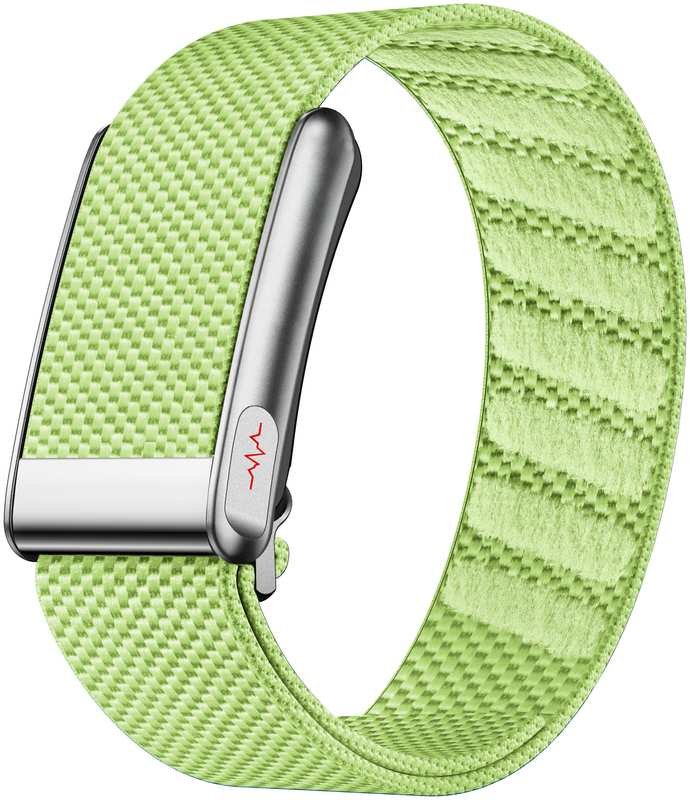
The E500 smart bracelet shows what honest NFC looks like on a budget device: NFC is listed as unlock — “NFC cool unlock” in the spec sheet — and the same sheet lists Alipay as not supported, so there is no payment function to misunderstand. It is screen-free by design: no display, no touchscreen, no buttons, no microphone or speaker. The 160mAh battery runs about 15 days of normal use and 25 days on standby, about 3 days with everything switched on; charging is magnetic, Bluetooth 5.4. The build is a zinc-alloy middle frame with ABS and PC, a 25mm strap, IPX8 (5ATM, third-party report), with RoHS, CE and FCC-ID certification, and the HealthWear app handles notifications by vibration. NFC unlock is the whole NFC story here — and the spec sheet says so plainly.
NFC sells the watch; the wallet decides whether the buyer keeps it. The same rule applies to every feature on the spec sheet — see our GPS accuracy guide for the same test applied to distance claims.
Related reading: Smartwatch Sourcing Guide — How to Choose a Smartwatch Supplier in China
Can a budget smartwatch with NFC pay at a shop terminal?
Almost always no. NFC is a short-range radio, not a payment system: tapping to pay also needs a secure element or host card emulation, tokenisation agreed with a bank, a certified wallet app, a device that passes the wallet’s security checks, and a bank that supports the wallet in the buyer’s country. Google Wallet needs Android 9.0 or higher on the phone, Wear OS 2.18 or higher on the watch, a screen lock set, and a Play Protect certified device — and most budget watches from China run a proprietary system, not Wear OS, so Google Wallet cannot be installed on them at all. Having NFC does not mean you can pay.
What does NFC do on a budget smartwatch?
In this price range, NFC always means access control: tapping a door lock, a gate or an office reader — sold in spec sheets as ‘NFC cool unlock’. It can also mean NFC tags and business cards, and in some markets transit cards. These are real uses, but not payments, and the listing has to say so. The E500 bracelet in our range is the honest version: its spec sheet lists NFC as unlock, and the same sheet lists Alipay as not supported, so there is no payment function to misunderstand. Before you order, ask the supplier which NFC functions the watch has — unlock, payment, transit or tags — and get the list, not just the letters ‘NFC’.
How should I list NFC on my product page to avoid returns?
Write what the NFC does and what it does not do, in the listing. Say ‘NFC door unlock’ and add ‘does not support Google Wallet, Apple Pay or card payments’, so the buyer finds out from you, not at the till. The return happens when a buyer orders for payments, tests the watch at a terminal on day one, gets nothing, and sends it back as ‘not as described’ with a one-star review saying ‘NFC doesn’t work’. The watch worked — the listing did not. Do not let the supplier’s poster write your listing: posters say ‘NFC’ in large letters and leave the rest to the imagination. Check the listing wording against your sample test result, word for word.
If you want samples tested for NFC unlock on a real reader, talk to us at HnThai.