Two runners finish the same 10K together, compare watches, and find a 400-metre gap. Nobody cheated and nobody got lost — the watches just disagreed. That gap is the most common GPS complaint in running forums — and a returns problem for importers, when a buyer tests a new watch on a known route and decides it is broken.
GPS error is normal — every watch has it. The importer’s job is knowing how much is normal, what makes it worse, and how to test a sample before the bulk order lands.
How far off can a watch be?
The most careful measurement is from Gilgen-Ammann and colleagues at the Swiss Federal Institute of Sport (JMIR mHealth and uHealth, 2020): eight models from Apple, Coros, Garmin, Polar and Suunto, 36 measurements per watch, over reference distances from 404 to 4,297 metres.
Mean absolute error was 3.2 to 6.1% by model; only Polar came in under 5%. In the city and forest every watch under-read, by up to 9% worst case; on the track, six of eight over-read. A later study (Jacko et al., Sensors, 2024) found errors of 0.8 to 12.1% over 4,000 metres on a 400-metre track.
A 5% error on a 10K run is 500 metres — and the error is not random: watches under-read under trees and between buildings, and over-read in the open.
Where the error comes from
Three things do most of the damage. First, reflected signals: in a city street the satellite signal reaches the watch bounced off facades, each reflection adding metres of error. A May 2026 preprint (Antoń et al.) put dense-urban horizontal error at 6.7 to 13 metres against a Leica GS16 reference. Tree cover does the same in a forest, which is why forest runs under-read.
Second, sampling: a watch records a position about once a second, and on a bend you cover a chunk of the arc in that second, so the track cuts the corner — the coastline paradox. Some watches ship with “smart recording” on, which drops points and makes it worse. Switch recording to every second before you judge a track.
Third, signal loss: watches switch to accelerometer estimation — steps from arm swing times stride length. The default stride model is built from height and can be off by 10 to 20% for a person. A watch that loses signal for a kilometre in a tunnel is guessing for that kilometre.
Single-band vs dual-band: what the words mean
A single-band receiver listens to one frequency (L1); a dual-band receiver — sold as multi-band — listens to two (L1 + L5), and the second frequency helps spot reflected signals. In city streets that is a real advantage, and the most useful question to ask a supplier.
It is not a fix by itself. Garmin forums carry long threads from Enduro 3 owners whose tracks zigzag across the street in multi-band mode, on a straight pavement walk. Antenna placement and firmware matter as much as the band count. Ask which constellations the watch uses — GPS alone, or GPS plus GLONASS, Galileo and BeiDou — and whether dual-band is fitted or just claimed. If the spec sheet only says “GPS”, treat it as basic.
The watch also corrects the distance — sometimes wrongly
Here is the part that surprises buyers: the distance on the watch face is not always the distance from the GPS track. Garmin watches blend GPS data with accelerometer and gyroscope data — forum users call it “black magic” — and the file distance often differs from the distance calculated from the GPX track. In one Enduro 2 thread the watch reported 14.81 km while the track calculated to 15.20 km. That calibration cannot be reset without a factory reset, unless an external sensor such as a chest strap or foot pod is used.
This matters because the test method changes the verdict. Strava’s “distance correction” recalculates distance from the raw GPS data, separating a GPS problem from a calibration problem. Compare both numbers — the distance the watch shows and the distance the raw track gives. If they disagree by a lot, the sensor fusion is doing more harm than good.
GPS also eats the battery
Continuous GPS is the heaviest load a watch carries after the screen, and a standby-days battery claim says nothing about a two-hour run. Ask for GPS-on battery life in hours, in writing, and how it was tested. Our charging guide covers what happens when the charger cannot keep up.
What to ask the supplier before you order
Get these answers in writing:
- Single-band or dual-band GNSS — and which constellations? Get the band and the system list, not just “GPS”.
- What is the recording interval, and can the user set it to every second?
- How long does a cold-start fix take outdoors?
- What is the battery life with GPS recording continuously? Ask for hours, not standby days.
- Can the app export the route as GPX or FIT? If buyers cannot see the raw track, they cannot check anything.
- Do you have test data against a known distance?
How to test GPS on samples
Run this on three samples:
- Pick a known route — a 400-metre track or a mapped 5K — and run it with the sample and a reference (a phone or a trusted watch).
- Repeat in three places: open park, tree cover, and a city street. The gap between the three tells you more than any single number.
- Export the GPX and open it in Strava, with and without distance correction. If the two numbers differ widely, the sensor correction is the problem, not the GPS.
- Look at the track shape: zigzags on a straight pavement, cut corners, jumps across buildings.
- Time the first fix from a cold start, and run GPS for an hour to check battery drain.
- Test with the phone disconnected. Phone-assisted GPS hides a weak watch receiver.
GPS watches from our range
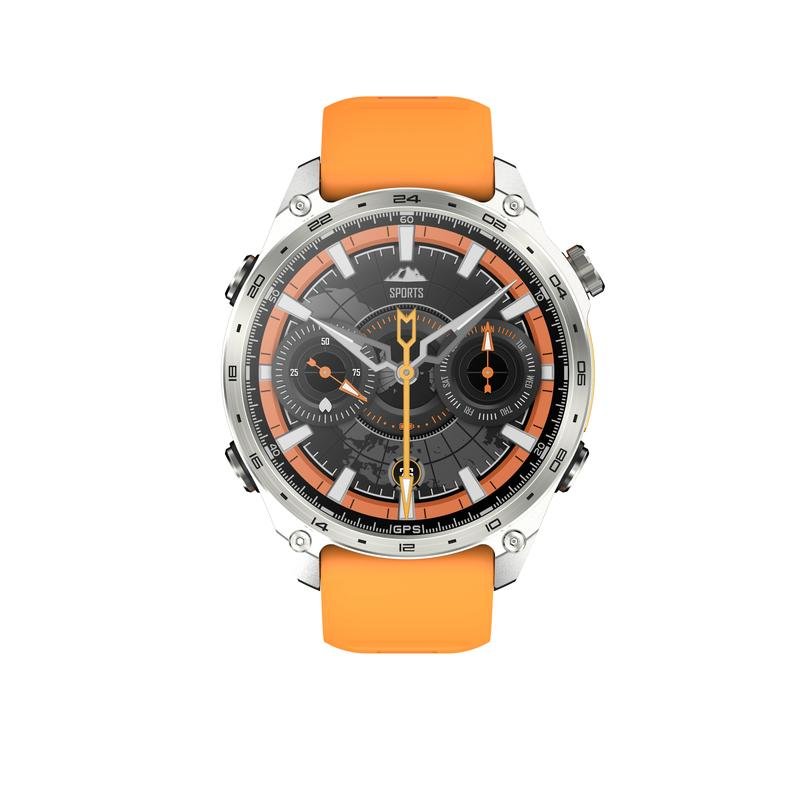
The HD300 Pro GPS smartwatch is built around this use case: a 1.43-inch AMOLED display (466×466) on an Actions ATS3085S chip, a named GPS chip — the AG3352B — 4GB of storage, Bluetooth calling over BLE 5.4, and an air-pressure sensor for altitude. The WearJoy app carries the route data, and the spec sheet lists an app market that includes Google Maps. The battery is 530mAh on magnetic charging, 3 hours for a full charge, 3 to 5 days of normal use, 15 to 20 days on standby; the case is 42.5mm by 12mm, rated 3ATM. One gap proves the point of this guide: the spec sheet does not state whether the GPS is single-band or dual-band, or which satellite systems it uses. Ask that first, in writing — before the order, not after the first complaint.
The GPS sells the watch; the accuracy decides whether the buyer keeps it. The same rule applies to every feature on the spec sheet — see our NFC guide for the same test applied to tap-to-pay claims.
Related reading: Smartwatch Sourcing Guide — How to Choose a Smartwatch Supplier in China
How accurate is smartwatch GPS on a run?
Some error is normal on every watch. In a 2020 study of eight models from Apple, Coros, Garmin, Polar and Suunto, average error was 3.2 to 6.1%, and only Polar came in under 5%. A 5% error on a 10K run is 500 metres. The error is not random: watches under-read under trees and between buildings, by up to 9% worst case in the city and forest, and over-read in the open — on the track, six of eight models over-read. A study found errors of 0.8 to 12.1% over 4,000 metres on a 400-metre track. Judge a sample against a known route, not against another watch, and expect a gap of a few hundred metres on a 10K.
What is the difference between single-band and dual-band GPS in a smartwatch?
A single-band receiver listens to one frequency (L1), while a dual-band receiver — sold as multi-band — listens to two (L1 + L5), and the second frequency helps spot reflected signals, which is a real advantage in city streets. But dual-band is not a fix by itself: antenna placement and firmware matter as much as the band count, and Garmin forums carry threads from Enduro 3 owners whose tracks zigzag across the street in multi-band mode. Ask which constellations the watch uses — GPS alone, or GPS plus GLONASS, Galileo and BeiDou — and whether dual-band is fitted or claimed. If the spec sheet only says ‘GPS’, treat it as basic, and confirm the band in writing before ordering.
How do I test GPS accuracy on smartwatch samples?
Run the test on three samples against a known route — a 400-metre track or a mapped 5K — with the sample and a reference such as a phone or a watch. Repeat in three places: open park, tree cover and a city street, since the gap between the three tells you more than any number. Export the GPX and open it in Strava with and without distance correction; if the two numbers differ widely, the sensor correction is the problem, not the GPS. Look at the track shape for zigzags, cut corners and jumps across buildings, time the first fix from a cold start, and test with the phone disconnected, since phone-assisted GPS hides a weak watch receiver.
If you want samples tested for GPS accuracy on a known route, talk to us at HnThai.