
A projector sample passes when it matches its spec sheet in the room your buyer will use: 200 ANSI lumens in the dark, native 1280×720 text that reads from the back row, and every port working on the first try. Test it the way your customer will use it, write down every result, and approve only the unit you tested.
Start with a written brief, not a video call
A sample that arrives without a brief gets tested against nothing. Before the sample ships, write down the use case: bedroom movies after dark, or meeting-room slides with the lights on. The two need different tests, even on the same projector.
Agree in writing which problems block approval. A port your customer needs must work; a menu wording preference can wait. Record the model, firmware version where available, supplied accessories, and any difference from the proposed production configuration. If the bulk run ships different firmware or a different remote, the approved sample is no longer the product you will receive.
Our guide to projector brightness shows why the brief matters: a “9,500 lumen” label often hides 200-400 ANSI lumens, and only a written ANSI figure on the order protects you.
The picture test: five screens, one setup
Use the same screen, image size, source, picture mode and room conditions for every check. Run five test screens in order: red, green, blue, white, and black, then a gray gradient, a grid, a text slide, and a moving clip.
The black screen shows unwanted light. The solid colors find dead or weak pixels. The white screen shows brightness balance and color spots. The gray gradient shows steps, noise, and poor calibration. The grid and the text slide show focus: check the center and the corners from your buyer’s seat.
Judge dead pixels against the contract, not against a word like “excellent quality.” One QC house lists a screen with dead pixels, uneven brightness or color shift as a major defect under AQL Level II inspection. Agree the allowed number, location and type of defective pixels in writing before the sample ships. One dead pixel in the middle of a white slide is a return.
| Check | How to test it | Pass mark |
|---|---|---|
| Brightness | Same screen and size, lights off, then one lamp on | Within 10% of the approved sample, same angle and distance |
| Dead pixels | Full red, green, blue and white screens | Zero dead pixels in the viewing area, agreed in writing |
| Text | 12-point slide at your buyer’s seating distance | Reads cleanly, center and corners |
| Focus | Grid image, corners and center | Sharp across the whole frame |
| Ports | Each port with the actual device your buyer uses | Starts, plays, sound works, survives a restart |
Connections and everyday use
Try each connection your sales promise includes, with the intended laptop or source device. Select the input, start playback, and check the sound. Then turn the equipment off and repeat the setup. Confirm that settings persist after an ordinary restart. If a connection fails, repeat it with a known-working cable first, so the report separates a projector fault from the chain.
Check the remote and everything in the box against the packing list. Then pack the projector away and set it up again using only the supplied instructions.
On the HY320 Mini, the connections to test are dual-band Wi-Fi 6, Bluetooth 5.0, one USB port, one HDMI port, and one audio jack, with a single 3W speaker for sound. HDMI is listed as optional on the sheet, so confirm in writing whether the unit ships with HDMI IN, HDMI OUT, or both before you approve the sample.
Run it, then run it again
Function checks come after a short run, not only out of the box. Run a full movie or a two-hour session and watch for shutdowns, fan noise that grows as the unit warms, and focus drift with heat.
Compare two samples side by side on the same screen, in the same picture mode, at the same size. If one is dimmer, stop the order and ask why. Photos and video document a visible fault, but they do not establish a lumen value: for any brightness figure you plan to publish, request the measurement method, instrument and settings from the supplier.
Record defects before you approve
Describe each problem clearly enough for the supplier to reproduce it: the sample identifier, the setup, what you did, and what happened against what you expected. Ask the supplier how it will fix the issue, then repeat the check after the correction.
Approve the specific configuration you tested, then arrange a separate inspection of the production batch before you accept a bulk order.
Featured model: the HY320 Mini
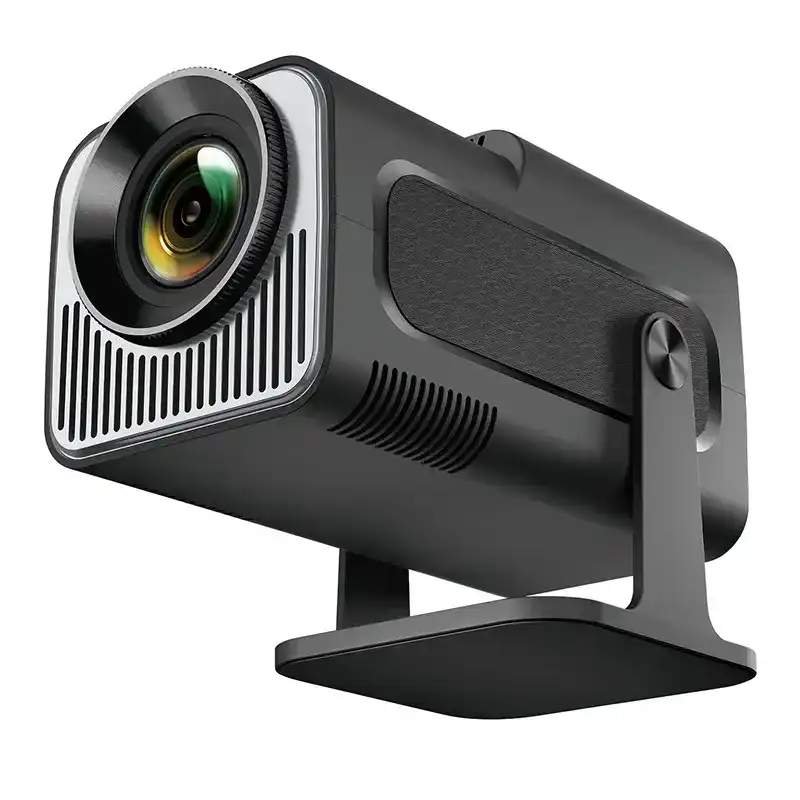
The HY320 Mini portable smart projector states 200 ANSI lumens on a native 1280×720 panel, with a 2000:1 contrast ratio, automatic keystone correction, and a 50,000-hour bulb life on the sheet. It runs Android with dual-band Wi-Fi 6 and Bluetooth 5.0, carries a single 3W speaker, and draws 40W from a standard outlet. Its body measures 90x98x175.5 mm, and it projects 30-150 inches from 1-4 metres. No battery is listed on the sheet, so confirm power options in writing if your buyer needs off-grid use. See our projectors page for the full HnThai projector range, and our mini projector buying guide for how brightness, resolution and ports compare across models.
Frequently Asked Questions
How many projector samples should I order before a bulk order?
Order two units of the same model at least. Test one hard and keep the second for side-by-side comparison on the same screen and picture mode. Order both in the same shipment so they come from the same production run, and keep the second sealed until the first passes. Two units that look different tell you the factory’s consistency is the risk, not the design. If the two match, you have a reference unit to hold against the bulk batch when it arrives.
What if the sample is brighter than the bulk batch?
Stop the shipment and compare the bulk unit against the approved sample at the same angle and distance. One QC house allows a brightness difference of 10% against the approved sample; anything beyond that is a failed batch. This is why the sample approval must name the exact configuration tested — model, firmware, picture mode — so the comparison is fair and the supplier cannot argue the test changed. Put the limit and the comparison method in the order before you pay the deposit.
How long does sample testing take?
A standard sample usually takes 3-7 working days to prepare, per one projector maker’s published guide. The testing itself takes a day or two: an evening for the picture and connection checks, plus one full two-hour run for sustained operation. Add time if the sample needs a fix and a re-test. If a corrected sample comes back, test it from the start again — a fix in one place can break something else. Never skip the re-test after a correction — the fix is part of the product.