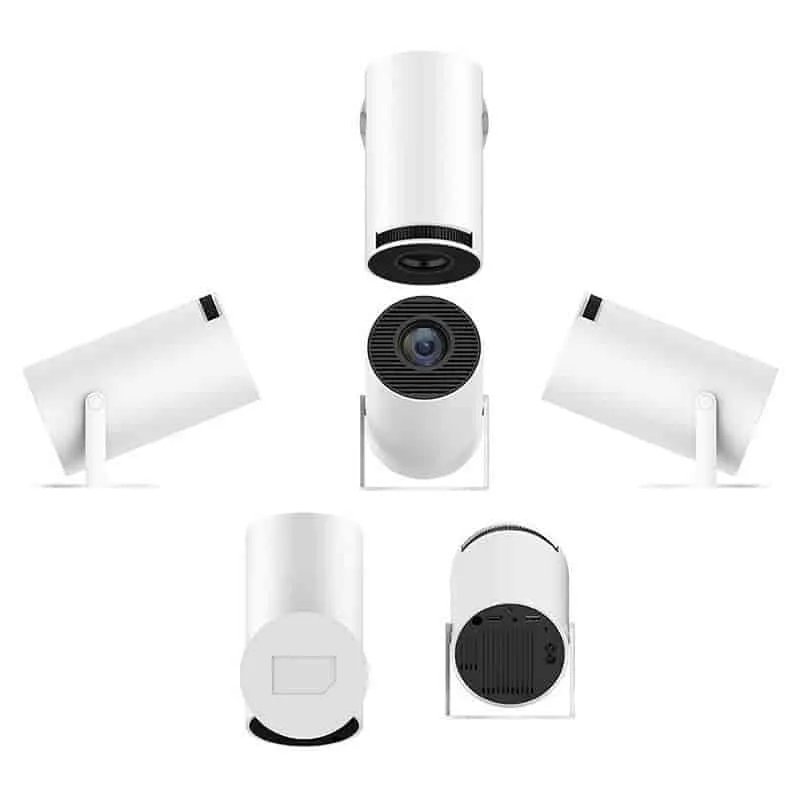
A good wholesale mini projector has at least 120 ANSI lumens for a dark room, native 720p resolution, and Wi-Fi 6 plus an HDMI port. The HY300 meets that bar: 120 ANSI lumens, a native 1280×720 panel, Android 11, and dual-band Wi-Fi 6. Ignore the big "lumens" number on the box and check those three figures first.
Brightness: read ANSI lumens, ignore the big number
Brightness is the most abused figure in projectors. One buyer bought a mini projector advertised at "9500 Lumens" for a backyard movie night, and the picture came out a dim, washed-out ghost. The number on the box measured the light at the bulb, not the light that reached the screen.
Only one brightness figure can be compared across brands: ANSI lumens. The method projects a white image, splits it into a 3×3 grid, and averages readings from nine points. A "9500 lumen" projector often turns out to be 200–400 ANSI lumens once measured that way. BenQ's conversion math puts the gap in plain numbers: divide "LED lumens" by 2.4 and "light source lumens" by roughly 16 to 17 to reach the ANSI figure.
The same model name can hide different figures. Listings sold under the HY300 name quote 120, 160 and even 200 ANSI lumens, while our own HY300 spec sheet states 120. That spread is why the ANSI figure on the actual unit, in writing, matters more than the number in the listing title. Epson has sued sellers over false brightness ratings.
What do the numbers mean in a room? For a pitch-black room with blackout curtains, 200–500 ANSI lumens gives a good picture up to 80–100 inches. The HY300's 120 ANSI lumens suits a dark bedroom or small meeting room at 40–130 inches, not a bright living room. The HY320 Mini, at 200 ANSI lumens, has more headroom in the same dark room. Neither is a daylight projector.
Resolution: native is the only number that counts
"Supports 4K" is the second trap: it means the projector accepts a 4K signal, not that it shows 4K. The number that counts is native resolution — the pixels on the panel itself.
The HY300 shows the gap clearly. Its panel is 1280×720 and its supported resolution is listed as 720p, yet its decoder still handles 4K at 30 frames per second — so a 4K file plays, downscaled to 720p on the wall. A buyer who reads "4K" in the title and expects a 4K picture will send the unit back.
All three models share the same native panel: 1280×720. The HY300 sells at $22–$55, the HY300 Pro at $32–$49, and the HY320 Mini at $32–$35 — three answers to the same 720p question, priced by brightness and form, not by pixels.
Ports and system: what your buyer plugs in
A mini projector lives or dies by its connections. Check four things on the sheet before you order.
First, Wi-Fi and Bluetooth. The HY300 runs dual-band Wi-Fi 6 with Bluetooth 5.0, so it streams without a dongle and pairs with an external speaker; the HY320 Mini carries the same module. Second, the operating system. All three models run Android 11, so apps install on the projector itself, and the HY300 boots in 3 seconds. Third, wired ports: one USB, one HDMI and one audio jack on the HY300 — but HDMI is listed as optional, so confirm in writing whether the unit ships with HDMI IN, HDMI OUT, or both. Fourth, sound. Each model carries a single 3W speaker, and fan noise sits under 25 dB on the HY300.
Three real models, three different answers
| Model | Brightness | Native resolution | Throw ratio | Keystone | Weight |
|---|---|---|---|---|---|
| HY300 | 120 ANSI lumens | 1280×720 | 1.37 | Manual | 0.8 kg |
| HY300 Pro | 160 ANSI lumens | 1280×720 | 0.9, short focus | Manual | 0.75 kg |
| HY320 Mini | 200 ANSI lumens | 1280×720 | 1.09 | Automatic | Not stated |
Three readings. First, brightness is the real price ladder: 120, 160 and 200 ANSI lumens on one shared panel. Second, throw ratio decides the room: the HY300 Pro's 0.9 short-focus throw fills 40–130 inches from 0.5–3 metres, while the HY300 needs 1.2–4 metres. Third, keystone: the HY320 Mini corrects it automatically, the other two leave it manual.
Choose by use case
Home theater buyers want the biggest picture from the shortest distance. The HY300 Pro fits: short-focus throw, 160 ANSI lumens, and a 0.75 kg body that sits on a shelf without a mount.
Portable buyers want brightness and easy setup. The HY320 Mini fits: 200 ANSI lumens, automatic keystone, and a 30–150 inch range from 1–4 metres. Its 40W draw runs off a standard outlet; no battery is listed, so confirm power options for off-grid use.
Classroom buyers want a projector that just works. The HY300 fits: Android 11 with apps on board, Wi-Fi 6, a 3-second boot, and a 50,000-hour bulb life on the sheet.
Featured model: the HY300
The HY300 LCD smart projector shows what a budget mini projector offers: a 2.69-inch LCD panel at 1280×720, 120 ANSI lumens, 1500:1 contrast, and a 3-piece glass lens, in a 100.8×188 mm body at 0.8 kg. It runs Android 11 on a quad-core ARM Cortex-A53 with 1GB of RAM and 8GB of storage; 2GB and 16/32/64GB are listed options. Every number there comes from the spec sheet. The sheet lists no battery, and HDMI is optional — confirm both in writing. See our projectors page for the full HnThai projector range.
Frequently Asked Questions
How many ANSI lumens does a mini projector need?
It depends on the room, not the box. For a pitch-black room with blackout curtains, 200–500 ANSI lumens gives a good picture up to 80–100 inches. The HY300's 120 ANSI lumens suits a dark bedroom or a small meeting room at 40–130 inches. The HY320 Mini, at 200 ANSI lumens, has more headroom in the same dark room. Neither is a daylight projector. Convert both figures to ANSI lumens before you compare — a figure without the word ANSI has no standard behind it.
Does "supports 4K" mean the projector shows 4K?
No. "Supports 4K" means the projector accepts a 4K signal and plays the file; what you see on the wall is the native resolution — the pixels on the panel. The HY300 decodes 4K at 30 frames per second, but its panel is 1280×720, so the picture it shows is 720p. The HY300 Pro and HY320 Mini share that panel. Always ask for the native resolution in writing, and treat "supports 4K" as a decoding feature, not a picture promise.
What should I test on a projector sample before a bulk order?
Test it in the room your buyer will use it in, at the size they will watch. Check the picture with the lights off and with one lamp on, and check text as well as video — soft text is the first sign of a weak lens. Test Wi-Fi streaming, Bluetooth pairing, and the remote from the back of the room. Finally, compare the ANSI lumens figure on the unit against the figure on the order — the unit in your hand is the only figure that counts.